Root
My personal knowledge companion
I spend a lot of time with books, podcasts, and long-form interviews — and for years, most of it evaporated. I’d remember that I heard something interesting, but not where it came from, why it mattered, or what I actually thought about it at the time. The same frustrations kept surfacing in conversation:
- “I remember hearing something like X in a podcast once.”
- “What book was that stat from?”
- “What were my actual takeaways from that source?”
Root is the fix: a personal knowledge companion for capturing what I consume, keeping every idea anchored to its source, and building my own thinking on top.
Having spent much of my life learning about investing, I think in terms of compounding — small, consistent deposits that accumulate into something outsized. Learning works the same way, but only if each insight lands somewhere it can build on the last. And in an age where AI can generate information effortlessly, the durable human advantage isn’t information at all; it’s judgment, taste, and a point of view earned by actually engaging with ideas. Root is my attempt to compound learning itself.
What Root Actually Does
Root is built around a simple idea: true learning only occurs if you actively engage with the material you consume. Instead of treating books, podcasts, and articles as disposable streams of information, Root turns them into structured, revisitable objects.
Rather than define the pieces in the abstract, here’s how they fit together — following one real thread through my library, shown the way it appears in Root itself.
Everything starts with a source — a book, podcast, interview, or article. Sources act as anchors, giving every idea a clear origin and preventing insights from becoming detached or misremembered.
Walter Isaacson
As I read, highlights become citations, and comments capture what I thought in the moment. Citations are concrete facts and quotes exactly as they appear in the source — precise, attributable, and free of interpretation. Comments are the margin notes attached to them: my own in-the-moment thinking, kept deliberately separate from the source material. A single citation can accumulate multiple comments over time as my thinking evolves.
““You son of a bitch!” Jobs said. But it was not in anger. There was a big grin on his face. As soon as he realized what Belleville and the other engineers had done behind his back, said Hertzfeld, “Steve swallowed his pride and thanked them for disobeying him and doing the right thing.”
”
Each source gets distilled into at most five takeaways. A source can hold dozens of citations, but Root caps takeaways at five — the limit is the point. It forces me to synthesize patterns and arguments instead of hoarding highlights.
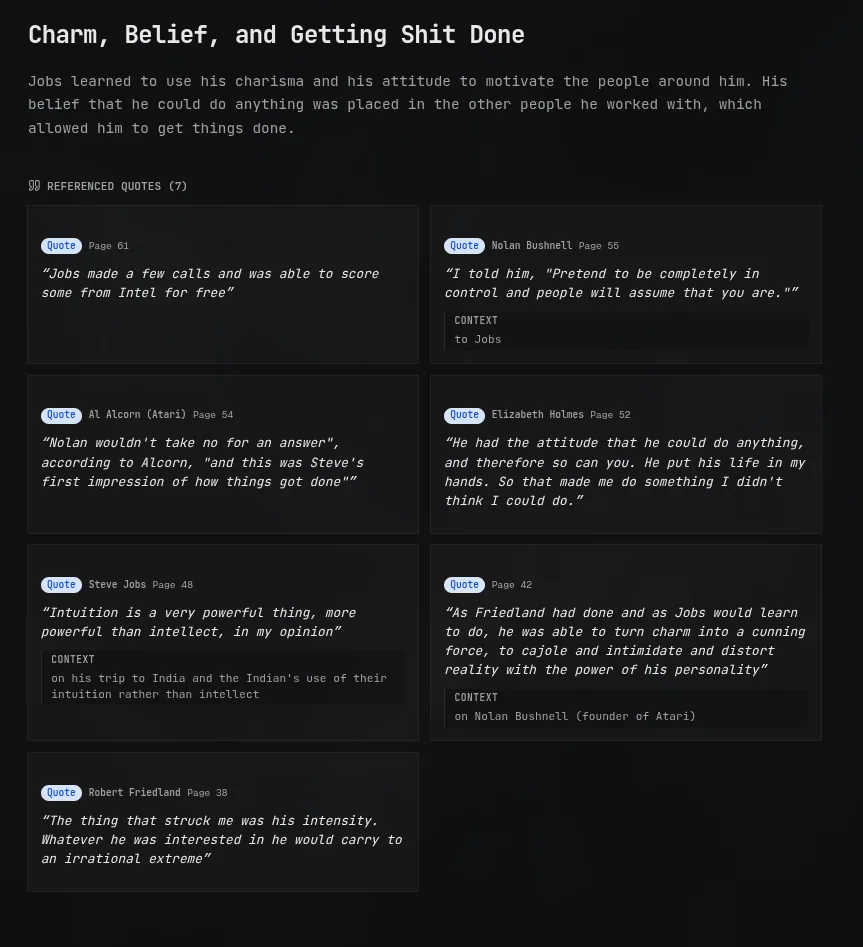
Charm, Belief, and Getting Shit Done
Jobs learned to use his charisma and his attitude to motivate the people around him. His belief that he could do anything was placed in the other people he worked with, which allowed him to get things done. Not only that, but he was a fantastic storyteller. His ability to paint a picture and narrative to motivate, coerce or convince was incredible.
9 quotes
Notes sit above individual sources. Where a takeaway distills a single source, a note weaves citations and themes from many — books, podcasts, interviews — into a longer, coherent argument. When the same idea starts appearing across multiple sources, that’s when a note begins. Isaacson describes Jobs’s obsession with “whole widgets” — products designed end-to-end, software tailored to hardware — and when the Cerebras CEO made the same argument about wafer-scale chips on a podcast months later, the overlap became this note:
Strengths of Vertical Integration
I actually really like the advantages of owning the entire stack (vertical integration). I think it makes your life really easy, as you don’t need to over adapt and defensively program since you can’t make that many assumptions. On the other hand, when you own the entire stack, it’s quite clear what can happen, and what can’t. This cohesiveness also allows you to create better, more integrated products…
Search & Retrieval
As the library grows, Root makes it easy to ask questions about takeaways, citations, or comments. It doesn’t just regurgitate summaries, but surfaces and references specific citations and takeaways to support its answer.
Graph
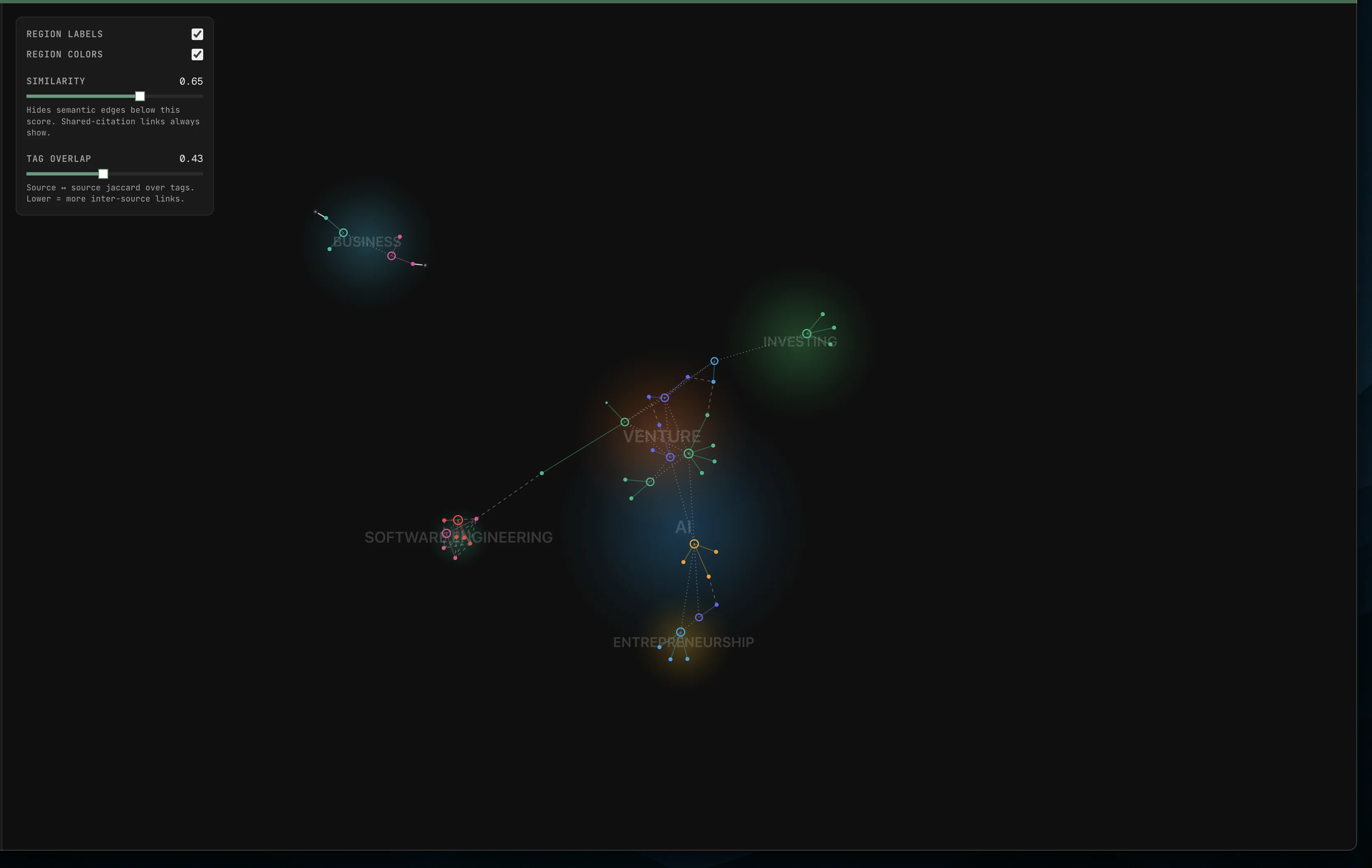
The graph projects sources, takeaways, and tags into a 2D embedding space and draws edges between semantically related items. Tag clusters surface as labeled regions — Business, AI, Venture, and so on — making it easy to see where my reading is concentrated and where adjacent threads connect. Graph V1 supports full interactive navigation. Sliders allow tuning similarity vs. tag-overlap thresholds to adjust semantic clusters, and the underlying neighborhood structure is wired to support smart recommendation workflows.
Guiding Principles
While Root has some “AI Powered” features, it is intentionally AI-assisted, not AI-driven. Real learning comes from friction and AI can often rob us of that friction.
Low friction, high fidelity — Knowledge should enter the system easily, but original source context is always preserved. A citation without its origin is just a floating quote.
Compounding value — The more you add, the more valuable the system becomes. Every highlight, comment, and note makes future retrieval and synthesis richer. This is the same logic as compounding returns: small, consistent deposits accumulate into something significant over time.
Incremental refinement — Insights aren’t fixed. A takeaway you write today might look different after you’ve read three more books on the same topic. Root is designed to support that evolution rather than freeze your thinking at a single point in time.
How I Use Root
Reading
I upload PDFs directly into Root and highlight text as I read, the same way you’d mark up a physical book. Highlights become citations I can reference later, search across, and pull into notes.
To bridge the gap with physical books, I am currently building a mobile image capture feature—allowing me to take pictures of highlights in printed books and run them through OCR. These scanned highlights flow directly into the suggestions pipeline so I can quickly approve and organize them without manually typing out long paragraphs.
Podcasts & Interviews
With podcasts and YouTube interviews, Root generates interactive transcripts. This makes it incredibly easy to skim through long discussions and see comments or citations mapped directly to specific audio segments.
The Walk While Talk flow. Capturing ideas while listening on the go used to be high-friction. Now it looks like this:
- 1
Tap voice capture
The player pauses automatically and starts recording.
- 2
Dictate the thought
A quick voice memo — no typing while walking.
- 3
Queued in the offline outbox
Memos wait locally until connectivity returns.
- 4
Uploaded & processed
Audio is transcribed and drafted as comments or citations anchored to the right timestamp.
- 5
Reviewed at my desk
I skim the transcript, see the drafts in context, and approve them to solidify the learnings.
Synthesis
As I’m finishing a source, I’ll often notice a recurring theme and start drafting a takeaway. I’ll give it a rough title and attach citations as I go. For example, while reading the Steve Jobs biography, a pattern that stood out early was his ability to persuade through charm and conviction; I created a takeaway around it — “Charm, Belief, and Getting Shit Done” — and linked supporting quotes as they surfaced (nine, by the end). When the same idea starts appearing across multiple sources, that’s when I’ll open a note and start writing something longer.
Roadmap
- building
Physical Book Highlights (OCR) — Quick photo capture of printed highlights, run through the suggestions review queue.
- planned
Guided Knowledge Synthesis — Proactive AI prodding on the dashboard — guided questions that help synthesize margin notes into takeaways via interactive chat, keeping the friction of active learning.
- planned
Global Search — Fuzzy search across citations, comments, and takeaways with filters.
- planned
Kindle & Web Clipper Extensions — Browser integrations for Kindle highlights and general article clips.
GitHub Activity
Commit history from project inception (up to 1 year).
Last updated Sep 18, 2026
Jun 16, 2026 — Python Backend + Dedicated Auth Server
Two big shifts. First, the Go API was fully migrated to Python: FastAPI now owns all CRUD, RAG, and external integrations, and Go was reduced to a migration runner that applies schema migrations on startup and serves /health. Second, Better-Auth was extracted out of the Next.js process into its own service (Hono on Bun) that owns the auth schema and exposes JWKS. The frontend stays same-origin by proxying auth traffic through Nginx, and FastAPI validates JWTs against the auth server’s JWKS endpoint over the internal network.
Services
- Frontend (Next.js): UI and routing. Proxies
/api/auth/*and/rag-api/*through Nginx; no longer runs Better-Auth in-process. - Auth Server (Hono/Bun): Dedicated Better-Auth service. Owns the
authschema (Drizzle migrations on startup), issues sessions + JWTs, and serves JWKS. - Python FastAPI: The application backend — all CRUD, RAG, embeddings, transcripts, and external integrations. Validates JWTs via JWKS.
- Go Migrator: Applies
public-schema migrations on startup, then idles serving/health. No application logic. - Database (Neon Postgres + pgvector): Source of truth for user data, the
authschema, and embeddings. - External Services: LLM + embedding providers, transcripts, and storage.
Jan 21, 2026 — Consolidated Ingress + Deploys
This iteration added a single entry point (Nginx) to simplify deployments, improve rate limiting, and make auth enforcement consistent across services.
Services
- Frontend (Next.js + Better-Auth): UI, routing, and session handling. Proxies API calls and reads auth/session data directly from Postgres.
- Nginx Gateway: Single ingress for
/go-apiand/rag-api, with rate limiting and routing. - Go API: CRUD, domain validation, and core write paths for sources, citations, captures, and tags.
- Python RAG Service: Embeddings, vector search, transcript workflows, and SSE streaming for LLM responses.
- Database (Postgres + pgvector): Source of truth for user data, metadata, and embeddings.
- External Services: LLM providers, embedding providers, transcripts, storage, and media APIs.
Dec 14, 2025 — Split RAG into Python
Early on everything lived in Go. I tried tool calls and RAG there, but it was verbose and slow to iterate. I then routed RAG through Go → Python, which added an extra hop and made the system feel like a brittle distributed proxy. The cleanest move was giving the Python service auth directly via JWKS, so the frontend could call it without a Go bridge.
I also moved the database from self-hosted Postgres on Dockploy to Neon for easier table visibility, safer backups, and less anxiety about losing data.
Services
- Frontend (Next.js + Better-Auth): UI plus proxy routes to Go and Python, adding JWTs on requests.
- Go API: CRUD and domain validation for the core app data.
- Python RAG Service: Vector search and LLM workflows, authenticated via JWKS.
- Database (Postgres + pgvector): Stores user content and embeddings.
- External Services: Embeddings + LLM providers.
Early Dec 2025 — Go Monolith
The first version was a single Go API focused purely on CRUD while I figured out the core entities and data model. This choice was primarily motivated by wanting to learn to use Golang and not having any prior experience using it. It worked well for basic operations. I briefly allowed server-side Drizzle reads to move faster during development, but dropped that to avoid splitting read paths and to keep a single, consistent CRUD interface through the Go API.
Services
- Frontend (Next.js + Better-Auth): UI and session handling, proxying everything to Go.
- Go API: CRUD only, no AI or RAG operations.
- Database (Postgres + pgvector): Stores user content and embeddings.
- External Services: Embeddings + LLM providers.
Monday, 8 June 2026 - Friday, 12 June 2026
Busy week decommissioning the Go API, migrating the video imports and suggestions features, implementing multiple captures, and unifying the RAG backend search services.
Major Features
- Go API Decommissioning: Decommissioned the Go API from serving application traffic. The Go project has been reduced to a database migration runner and
/healthchecker. Removed the Next.js proxy, custom nginx routing rules, and the orval-generated Go client. All CRUD, auth, and business logic endpoints are now 100% owned by FastAPI. - FastAPI Code Reduction: Deleted 9,643 lines of handwritten Go code and 8,487 lines of generated code, adding only 1,924 lines of Python implementation and 904 integration tests—achieving a ~5:1 implementation code swap ratio by leveraging SQLAlchemy, Pydantic, and shared helper patterns.
- Multiple Captures: Completed a port allowing multiple captures (margin comments) per citation. Redesigned the frontend’s citation sidebar into a two-column editor (displaying a list of capture cards and editing fields on the right) and refactored mobile highlight views to show all child comments.
- Suggestions UI Polish: Upgraded the suggestions management interface in frontend and mobile. Made suggestions mutually exclusive with existing citations, added dismissed suggestions filters, and built robust validation rules.
Minor Features
- Unified Video Import: Consolidated YouTube importing directly into the main Create Source modal with channel and thumbnail confirmation widgets. Standalone discovery grid pages were deleted to clean up the navigation hierarchy.
- Voice Agent Evaluation: Implemented a real-time, low-latency voice agent prototype utilizing ElevenLabs WebSockets. Development was subsequently paused due to high API cost overhead and tool-calling documentation friction, shifting short-term focus toward refining user suggestion workflows.
Maintenance
- Embedding & Search Consolidation: Refactored vector search backend methods. Unified all upserting and single-row generation behind shared helpers and consolidated query logic under a unified vector search core.
- Transcript Pipeline Consolidation: Unified YouTube and Podcast transcript generation logic under a single
TranscriptPipelineservice using AssemblyAI and Cloudflare R2 storage. - CI Test Suite Overhaul: Replaced SQL schema seedings in CI with real migrations run against a test database. Migrated test setups to SQLAlchemy factory patterns and consolidated tests into unified smoke-test CRUD walks.
Monday, 1 June 2026 - Sunday, 7 June 2026
Focus this week was completing the stats dashboard and dashboard analytics, centralizing database datetime handling, and moving remaining collection and sync endpoints to FastAPI.
Major Features
- Stats Dashboard & Backfills: Completed the admin user engagement stats page. Added aggregation logic for sources, citations, takeaways, and comments over a rolling 90-day window with Recharts trends, alongside backfill tools for user data.
- Timezone Standardization: Centralized datetime helpers. Standardized all PostgreSQL database writes on naive UTC instants to avoid asyncpg offset errors when binding offset-aware inputs to naive columns.
Minor Features
- FastAPI Services Migration: Migrated playback progress sync, podcast show details, and source collections management from Go to FastAPI.
- Graph Visualization Refinement: Continued improving layout rendering and label placements for the 2D visual graph view.
Maintenance
- Service Layer Restructuring: Large cleanup pass restructuring the Python codebase. Set up proper OpenTelemetry instrumentation and Logfire logging pipelines across the entire service module.
Monday, 25 May 2026 - Sunday, 31 May 2026
Big migration week. Continued moving CRUD operations off the Go API and into FastAPI, and shipped a first cut of the knowledge graph.
Major Features
- Graph V1: A new visualization layer over the library — sources, takeaways, and tags are projected into a 2D embedding space with semantic edges drawn between related items. Region labels (Business, AI, Venture, Software Engineering, Entrepreneurship) are derived from tag clusters, and similarity / tag overlap sliders let you tune how much shared-meaning vs. shared-tag structure shows up in the view. For now it’s purely visual, but the underlying neighborhood data opens the door to recommendation and “what should I read next” workflows.
- Captures → Comments: Renamed “captures” to “comments” throughout the frontend. After a few months of use, “capture” felt overloaded; “comment” better matches the actual mental model of a margin note tied to a source.
- Suggestion Validation: Suggestions are now validated against the source before being surfaced — fewer hallucinated quotes and fewer “this isn’t even in the transcript” suggestions.
Maintenance
- FastAPI Migration (continued): Migrated notes, admin endpoints, the tags API, captures, assign-highlight, list-by-source, and collections from the Go API to FastAPI. The Go API surface is shrinking week-over-week as the consolidation continues.
- Routing & Typing: Centralized routing in FastAPI and tightened API types end-to-end.
- UTC Hygiene: Added explicit UTC markers across datetime strings to stop subtle off-by-timezone bugs.
- Batch Embedding: Moved embedding generation to UV and batched calls for noticeably faster reindexing.
- Unsorted Citations Fix: Fixed a bug where you couldn’t create unsorted citations / comments — they now flow through the same path as sorted ones.
Monday, 18 May 2026 - Sunday, 24 May 2026
Mobile-focused week with a deeper home page rework, plus foundational work on the graph that landed the following week.
Major Features
- Mobile Home Page Rework: Rebuilt the mobile home around source-first navigation — recent sources, in-progress items, and quick comment entry are now front and center instead of buried behind tabs.
- Voice Capture Button: Added a dedicated voice capture button on the mobile source view so you can dictate a comment without breaking out of the reading flow.
Minor Features
- Section Moves & Highlights: Improved the ergonomics of moving highlights between sections, especially on mobile.
- Mobile Settings: Built out a proper mobile settings screen instead of relying on the web layout.
- Section Suggestions: Suggestions can now be scoped to a specific section rather than the whole source.
Maintenance
- Section Simplification: Removed the section pill UI and simplified the underlying section model — fewer indirection layers, less surface area to maintain.
- Resectioning Logging: Added structured logs around source resectioning to debug a class of edge cases where highlights would drift between sections.
- FastAPI Refactor: Another pass of FastAPI cleanup focused on typing and module boundaries.
Monday, 11 May 2026 - Sunday, 17 May 2026
Heavy migration and editor week — moved takeaways to the TipTap-based rich text editor and continued centralizing infrastructure concerns.
Major Features
- Takeaways in TipTap: Migrated takeaways to the same TipTap-based editor used for notes. Takeaways now support inline citations, rich formatting, and the same embedding patterns as notes — closing the gap between “short synthesized insight” and “long-form essay.”
- New Podcast Player: Rebuilt the in-app podcast player with a cleaner control surface, better progress feedback, and tighter integration with the transcript view.
- Improved Transcript Page: Reworked the transcript page with section-aware navigation, a sections slideover, and better handling of long transcripts.
- ElevenLabs Voice Agent: Switched the mobile voice agent from the previous provider to an ElevenLabs WebSocket pipeline. Added an offline ask-run store so voice queries queue locally and replay when the connection is back.
Minor Features
- Source Suggestions: New suggestion type at the source level (in addition to section-scoped ones).
- New Note & Suggestion UI: Refreshed the note creation flow and the suggestion card design.
- Command Palette: Another round of command palette polish.
Maintenance
- Backend Centralization: Centralized errors, integrations, and request schemas in FastAPI for clearer separation of concerns.
- Frontend Takeaways Refactor: Pulled takeaway logic into shared repository methods on the backend and updated all frontend call sites.
- Memory Leak Fix: Fixed a memory leak in the refresh path that was slowly degrading long-lived sessions.
- Redundant Deletes: Removed redundant delete logic between takeaways and citations now that the data model is unified.
Monday, 4 May 2026 - Sunday, 10 May 2026
Started picking up speed again with a focus on mobile and agent-driven workflows, adding a persistent assistant surface, real-time voice, and a new analytical home for the web.
Major Features
- Global Assistant & Surface: Replaced the standalone “Ask” page with a persistent Assistant Surface. It’s a slide-out panel accessible from anywhere in the app, featuring reasoning visualizations, tool-call tracking, and a conversational history that persists across sessions.
- Voice Agent V1 (Mobile): Experimental voice agent for the mobile app. Built on WebRTC, it allows for low-latency, real-time voice conversations with your knowledge base.
- Suggestions Engine: New “Suggestions” API and UI to proactively identify uncaptured citations and potential takeaways from transcripts, reviewable via mobile.
- Analytical Dashboard: Redesigned the web home page into an analytical dashboard with an activity feed, learning velocity stats, and recent note previews.
- Offline Podcasts (Mobile): Background download manager for the mobile app to save podcast episodes for offline listening.
Minor Features
- Mobile UX: Refactored mobile source detail pages and player, including a new “Car Mode” overlay.
- Conversational RAG: Upgraded the RAG service to support multi-turn dialogues with persistent context.
- Improved Transcription: Added animations and better progress feedback for real-time transcription.
Maintenance
- Infrastructure: Updated Nginx config and Jetflow orchestration for better agent reliability.
Monday, 20 Apr 2026 - Sunday, 26 Apr 2026
Slow week. Mostly just cleaning up the RAG pipeline and some general refactoring.
Minor Features
- RAG Refinement: Cleanup pass on the RAG pipeline to remove redundant logic.
- Refactoring: General code hygiene.
Monday, 13 Apr 2026 - Sunday, 19 Apr 2026
Low energy week with just a few small fixes and cleanups.
Minor Features
- Notes Cleanup: Removed redundant “Add Note” actions.
Maintenance
- Transcript Fixes: Fixed latest transcript fetching logic.
Monday, 6 Apr 2026 - Sunday, 12 Apr 2026
This week turned the Command Palette and Pickers into first-class architectural citizens and introduced a new four-stage lifecycle for sources, including a dedicated phase for reflection.
Major Features
- Four-Stage Source Lifecycle: Replaced the simple status toggle with a structured four-stage workflow:
todo,in_progress,reflecting, anddone. This transition reflects the reality of deep reading—moving from consumption to active synthesis before marking something as complete. - The Reflection Layer: Introduced a dedicated “Reflect” tab for sources in the
reflectingstage. This serves as a nudge to stop consuming new content and instead synthesize highlights, find threads, and figure out what actually stuck. - Command Palette V2: Overhauled the navigation experience from the ground up. The command palette is now a custom, plugin-based engine that adapts to your context—automatically surfacing relevant actions for the source, collection, or library view you are currently in. It now includes priority-based action surfacing and configurable global shortcuts.
- Pickers & Flows: Promoted “Pickers” to a standalone API, enabling more composable UI patterns. Combined with the new “Flows” engine, the system can now handle complex, multi-step navigation and actions (e.g., picking a source and then a specific section) with consistent ergonomics.
Minor Features
- Global Shortcuts: Introduced configurable global shortcuts to trigger specific flows or navigate to core areas of the application regardless of current focus.
- UX Refinements: Simplified the action scoping logic to reduce cognitive load when searching for commands.
- Source Tracking: Added
started_at,reflecting_at, andcompleted_attimestamps to better track your learning velocity and history.
Monday, 30 Mar 2026 - Sunday, 5 Apr 2026
Shifted the organizational model toward a “Library” structure, introducing Collections for high-level grouping and foundational storage improvements.
Major Features
- The Library & Collections: Reorganized the primary navigation under the “Library” nomer. Introduced Collections to group related sources into themed buckets, providing a dedicated space for deep-dive research and discovery.
- PDF & Storage Hygiene: Added the ability to replace PDF files to recover from accidental uploads. More importantly, implemented proper cleanup logic so that deleting a source now correctly removes its associated files from R2 storage, preventing orphaned “ghost” files.
Minor Features
- Contextual Navigation: Added “Go to Section” commands and smarter autofocus/selection logic when creating citations to keep you in the flow.
- Library Search: Added a subtitle and search bar to the new Library views to help handle larger collections of research.
Maintenance
- Go API R2 Integration: Moved R2 storage management directly into the Go backend. This ensures all CRUD operations for media and PDFs go through a single Source of Truth (SoT) with better consistency.
- UI/UX Refactor: Conducted a sweep of the interface to accommodate the new Collections-based navigation and Library hierarchy.
Monday, 23 Mar 2026 - Sunday, 29 Mar 2026
Focused on the “Resumption” workflow—making it easier to pick up where you left off—and introduced a deeper layer for long-form reflection.
Major Features
- Source-Scoped Notes: Introduced a deeper reflection layer linked directly to specific sources. This leverages the rich-text editor to let you embed and edit quotes while writing longer pieces. These aren’t just takeaways; they are a space to explore thoughts, a shift that is currently challenging the long-term vision of how “takeaways” should function.
- Resume-Driven Home Page: Redesigned the dashboard to focus on active work. The goal is to get you back to exactly where you were—whether that’s the specific chapter of a book or the last timestamped note in a podcast.
- Source Status & Filtration: Added
todo,in_progress, anddonestatuses (later expanded to includereflecting). This allows for richer filtration and the ability to move completed research “out of mind” while keeping the focus on active threads.
Minor Features
- Chapter Detail Pages: Added dedicated views for sections, providing a focused environment for consuming and annotating specific segments of a source.
- Navigation Shortcuts: Added “Notes” and “Sections” to the command palette for faster internal source navigation.
Maintenance
- Implemented backend support for source-scoped notes and the new home page logic in the Go API.
Monday, 2 Mar 2026 - Sunday, 8 Mar 2026
Launched Notes, bridging reading and long-form thinking in one place.
Major Features
- Notes V1: A rich-text writing environment where notes can stand alone or link to highlights from your reading.
- Citation Embeds: Inline citations can be inserted directly into notes, keeping your writing grounded in the sources it draws from.
- Autosave & Drafts: Notes save automatically and persist locally, so work is never lost between sessions.
Minor Features
- Added a sticky header that reveals on scroll for better navigation on long pages.
- Improved saving feedback across forms to handle network edge cases more gracefully.
Maintenance
- Implemented all note-related endpoints and data relationships in the Go API.
- Refactored backend store and repository patterns to support note-to-highlight relationships.
Monday, 23 Feb 2026 - Sunday, 1 Mar 2026
A week of active use and frontend refinement — improving the durability and feel of the media experience.
Major Features
- Source Page Refactor: Decomposed the monolithic source detail view into specialized, type-safe pages (
Podcast,Video,Pdf, andDefault). This reduced client-side complexity and improved page load performance. - Podcast Archiving: To prevent timestamp drift and broken links, podcast audio is now automatically archived to R2 storage upon transcript generation.
- Media Hotkeys: Added comprehensive keyboard shortcuts for the YouTube player (Space to play/pause, Arrow keys for 10s seeking) with smart focus management to prevent hotkey “swallowing” the embedded player.
Minor Features
- R2 Storage Durability: Switched from storing volatile presigned URLs to persistent R2 keys, generating fresh URLs on-demand to avoid expiration issues.
- Optimistic UI: Added optimistic updates for source section summaries, making the organization workflow feel instantaneous.
- Design: Public Profiles: Drafted and documented the visibility model (
none,feed,public) to prepare for the upcoming social and sharing features.
Maintenance
- Implemented a unified R2 storage interface in the Go backend for consistent file handling.
- Fixed a bug where the command palette could fail to navigate to specific source types.
Monday, 16 Feb 2026 - Sunday, 22 Feb 2026
Focused on refining the RAG experience with better tool orchestration and UI responsiveness, alongside UX improvements for media and manual workflows.
Minor Features
- Implemented tool call filtering to improve agent reliability.
- Refactored and improved loading states in the frontend for RAG, providing better feedback during multi-step reasoning.
Maintenance
- Refined podcast listening and manual workflows to identify and resolve UX friction points.
Monday, 9 Feb 2026 - Sunday, 15 Feb 2026
Highlights and transcript improvements to support better editing workflows.
Minor Features
- Removed text-based match requirement for highlights in the transcripts tab. This allows users to edit and clean up transcript highlight content (e.g., correcting misspelled names) before saving.
Monday, 2 Feb 2026 - Sunday, 8 Feb 2026
Performance-focused week aimed at stabilizing transcripts—plus a big new source type.
Major Features
- PDF support with highlights: upload PDFs, select and highlight text, persist highlights to DB, and include them in RAG retrieval. Forked and improved an open-source PDF highlighting library to fix underlying API issues.
Minor Features
- Added optimistic updates for PDFs and transcripts to avoid laggy UI feedback.
- Hid the incomplete review feature in the UI while it matures.
- Reworked dialog system and added pickers for more composable workflows.
- Reworked citation location storage to support long-term versioning and clarify derived vs manual locations across BE and FE.
- Improved dialog and picker flows for async behavior, error handling, and workflow chaining.
Maintenance
- Fixed massive re-rendering issues in the transcripts tab to resolve major performance regressions.
- Temporarily removed video timestamp sync to keep transcript playback responsive.
- Moved FastAPI telemetry to Logfire for stronger OpenTelemetry support.
- Cleaned up AGENTS.md and Claude docs to keep agent guidance in sync with current best practices.
- Removed dead code across the project to reduce maintenance overhead.
- Switched nginx to a custom-built image so config changes trigger rebuilds and redeploys; removed bind mounts and baked config into the image via
nginx/Dockerfile. AddedX-Config-Revresponse header to verify the running config after deploy.
Monday, 26 Jan 2026 - Sunday, 1 Feb 2026
Started the week with PWA foundations and mobile-readiness.
Major Features
- Basic PWA support with
manifest.jsonfor home screen installation. - Consolidated dialogs into one
citationDialogwith optional notes and other parameters. - Citations can now belong to multiple takeaways (many-to-many); selecting a citation in the takeaway editor is no longer blocked if it’s already used elsewhere.
Minor Features
- Mobile UI enhancements and improvements.
- Added amber “In X takeaways” badges to citations in the highlights tab and takeaway editor, with tooltip showing takeaway titles on hover and click-to-navigate when there’s only one takeaway.
- In the “Add to Takeaway” dialog, takeaways already containing the citation are now visually disabled.
Monday, 19 Jan 2026 - Sunday, 25 Jan 2026
Short week focused on security, deployment hygiene, and improving the API entry point.
Major Features
- Created Production environment for all services
- Implemented embeddings and vector search support for source summaries.
Minor Features
- Enabled model selection in the Ask feature, plus a reasoning dropdown.
- Added CAPTCHA for login, signup, and other auth flows.
- Added source section summaries and displayed them on the overview page.
Maintenance
- Fixed bug in the context menu for editing highlight-items.
- Fixed bug in edit-section dialog which would delete summary field
- Fixed bg color of mention modal to adapt to Color theme
- Simplified the architecture via Compose in Dokploy and added Nginx as a single API entry point with rate limiting.
- Cleaned up and removed old env vars that were over-engineered or no longer necessary.
- Deployed a new production instance and migrated all data from dev to prod.
- Removed unused schema columns (e.g., nested
source_sectionswithparent_id) to reduce FE/BE complexity. - Started using Doppler locally to sync env vars across machines and setups.
- Improved Makefiles for better local UX (seeding DB, creating test users, starting services).
Monday, 12 Jan 2026 - Sunday, 18 Jan 2026
Big week shipping transcripts across video and podcast sources, plus UX and architecture upgrades.
Major Features
- Transcripts for videos (YouTube) with Webshare proxying to avoid blocking.
- Transcripts for podcasts: RSS ingestion, shows in DB, episodes in DB, and on-demand transcripts via AssemblyAI.
- In-app podcast and YouTube players so you can listen/watch while reading transcripts.
Minor Features
- Added a transcript timestamp location type for transcript-based notes vs manual notes/citations.
- Improved the Cmd+K dialog with smoother movement and quick navigation to sources.
- Added keyboard shortcuts across pages (e.g., O = Overview, T = Transcript, S = Sections/Highlights on a Source).
- Migrated to base-ui in shadcn with the Lyra preset (boxier UI, replacing Radix UI).
- Added hover behavior for sidebar tooltips.
- Created a clearer transcript dialog flow (UI no longer mirrors BE storage directly).
Maintenance
- Improved transcript rendering performance, especially highlight rendering.
- Removed SSR to simplify data loading and state management.
- Upgraded and re-embedded everything with Voyage 4.
- Set up R2 storage connections and credentials for multiple buckets.
- Refactored FastAPI for better separation (routers, services, repositories).
Monday, 5 Jan 2026 - Sunday, 11 Jan 2026
Admin tooling and quality-of-life week, plus embedding and ranking upgrades.
Major Features
- Built out the admin UI with user stats (citations, captures, takeaways) and trends.
- Added admin user stats API endpoints and repository layer to support the dashboard.
Minor Features
- Added Meta/Ctrl + Enter submit in forms.
- Batched embedding calls in the admin UI.
- Upgraded reranking to v2.5 with instructions.
- Switched to
voyage-3-largeembeddings at 1024 dimensions via matryoshka embeddings.
Maintenance
- Fixed lots of small bugs and added additional loading states.
- Updated documentation with best practices.
- Removed deprecated code from the Go API (old River queue logic).
Monday, 29 Dec 2025 - Sunday, 4 Jan 2026
Review system foundations and RAG search upgrades.
Major Features
- Shipped review system v1 backend foundations (schema, services, handlers) plus review generation endpoints.
- Built LLM-based review item generation with structured prompts and validation.
- Added BM25 as an additional search path for Ask (hybrid retrieval improvements).
Minor Features
- Added takeaway support to the RAG pipeline.
- Started the review feature module on the frontend and added design docs for review UX.
Maintenance
- Fixed SQL issues in review streak calculations and cleaned up duplicate queries.
- Refactored frontend utilities for clearer separation of concerns and improved docs.
- Removed deprecated Go API code and tightened configs.
Monday, 22 Dec 2025 - Sunday, 28 Dec 2025
Moved the product to a cleaner Go-API-first architecture while strengthening RAG responses with richer citation context. The RAG service also went through a round of agent and ORM refactors to make the new pipeline more reliable.
Major Features
- Completed the migration of sections, takeaways, captures, and related CRUD to the Go API, removing remaining Drizzle routes to make the Go backend the single source of truth.
- Added citation speaker/context metadata to RAG capture retrieval so answers and reference chips expose more context.
- Introduced Jetflow-based agent orchestration and refactored the RAG service around modular actions.
Minor Features
- Added an unsorted captures endpoint to support surfacing unorganized items.
Maintenance
- Consolidated frontend data access to generated Go API types and removed legacy query/data layers.
- Added tooling for cloning dev data and updated RAG service dependencies and docs.
Monday, 15 Dec 2025 - Sunday, 21 Dec 2025
This week focused on a new RAG agent foundation, admin tooling, and backend organization improvements. Several UX and reliability cleanups landed alongside the structural work.
Major Features
- Introduced a Jetflow-based RAG agent architecture to power multi-action search and orchestration.
- Added admin UI and API support for user stats and basic admin workflows.
Minor Features
- Fixed create-capture dialog overflow and related source-detail UI edge cases.
Maintenance
- Reorganized Go backend packages for reuse and clarity.
- Added Cypress smoke testing scaffolding and refreshed documentation and scripts.
- Refactored the RAG service toward an ORM-backed data layer.
Monday, 8 Dec 2025 - Sunday, 14 Dec 2025
RAG V1 landed end-to-end, including embeddings, hybrid retrieval, and streaming responses, and then moved into its own Python service. Tagging and takeaways continued to mature on the frontend.
Major Features
- Shipped RAG V1 with Voyage embeddings, hybrid retrieval, and grounded LLM answers with streaming.
- Migrated RAG to a Python microservice with a Go proxy and client interface.
- Added Tagging V1 and expanded tagging across core entities.
Minor Features
- Expanded takeaways with view/edit flows and section editing improvements.
- Refined the command palette and unsorted citations UX.
Maintenance
- Improved RAG logging, error handling, and SSE stability.
- Updated schemas and tightened security/documentation updates.
Monday, 1 Dec 2025 - Sunday, 7 Dec 2025
The project shipped a major cleanup pass with structured notes, new citation metadata, and a streamlined UI. Core source and capture flows were upgraded, while the recall feature was removed.
Major Features
- Reworked citations into structured locations and sections, plus new capture CRUD and highlight flows.
- Added speaker and context fields on citations and support for standalone captures.
- Removed recall features across backend and frontend.
Minor Features
- Introduced theme-based colors and polished home/source layouts.
- Fixed sidebar state persistence and dialog UX glitches.
Maintenance
- Refactored backend organization and validation, plus environment/config cleanups.
Key Takeaways
Deployment & Infrastructure
- Docker Compose vs. Individual Dockerfiles: Switching to Docker Compose
allowed me to more clearly see exactly what variables are needed for specific
services. In Dockerfiles, it’s often not that clear-cut since you’re just
injecting environment variables. Seeing it all defined in a single
docker-compose.ymlis significantly more useful for maintaining a clear overview of service dependencies and configurations.
Language & Tooling
- Golang: Go is really great. Its error-first approach is kind of nice and makes you think about errors early. However, if you’re developing a product while trying to figure out the kinks, it’s a little slow since it’s so verbose (especially if you’re doing DB migrations etc). That said, its declarative approach is really nice—compared to something like Spring Boot where everything is super “magicky,” in Go, 99% of behavior is explicitly defined somewhere.
- Python / FastAPI Ecosystem for AI: While Go is highly performant, Python’s ecosystem is simply far riper once you start building AI or RAG features and integrating various SDKs (Voyage, OpenAI, ElevenLabs, AssemblyAI). Furthermore, keeping a split backend creates unwanted duplication of repository methods, types, and database utilities. Consolidating the backend entirely in FastAPI avoids this duplication.
- Voice APIs & Real-time Audio Cost: Real-time voice agents (via ElevenLabs WebSockets) are cool, but API cost scaling is incredibly high and tool-calling documentation remains immature.
UX and Development
- Super easy to do db migrations early — it’s better to spec out user flows and figure out what workflows you want to develop (also faster to iterate FE)
- Vibe Coding & Rapid UX Prototyping: It is highly valuable to spend a few hours “vibe coding” new features and UX workflows to get a feel for what constitutes a high-leverage action before committing to database migrations or rigid schemas. Because the entire FastAPI backend and API surface was already set up, throwing together a new mobile app took only a couple of hours since all the backend heavy lifting was already done. This low-friction environment allowed for rapid experimentation; for example, building out the mobile app with the suggestions mechanic has been a game-changer—10x’ing the amount of podcast listening I do and exponentially increasing the volume of insights I actually retain.